


Aurora, the latest release of Scroll Cinema, significantly improves editor workflows, making the tool easier to work with. It also improves performance (particularly on mobile) making your projects ready to show to a larger public.
In addition, it contains a preview of the upcoming Logic system, which will allow for configuring interactivity, such as clickable elements, to trigger animations and gameplay.
Highlights
Bulk timeline selection and manipulation. The Timeline Inspector now has bulk selection and manipulation tools:
- The arrow buttons will select all timeline assets following or preceding the scrubber playhead, and you can also restrict the selection based on which tracks you’ve selected.
- The Set button will put selected timeline assets at the scrubber playhead.
- The Set (<>) button will translate the selected timeline assets to the scrubber playhead, maintaining relative positions to each other.
Improvements to group nodes and track folders. As projects become larger, efficient use of grouping is key to keeping organized and making robust animations. Group nodes and track folders are now created inline, so you can more easily iterate at the speed of your creative ideas.
Smoother timeline scrubbing. A key cosmetic bug causing flashing of content while scrubbing has been fixed.

Performance Improvements. Using the new Optimization window, if your project includes images, you can now automatically improve the performance of your scrollies with one click.
Just press the “Create Spritesheets” button whenever you upload new images and are ready to test or publish, and Scroll Cinema will bundle and compress your images into efficient spritesheets.
Alongside other under-the-hood optimizations, this makes scrollies ready to be experienced by more people on a wider range of devices.
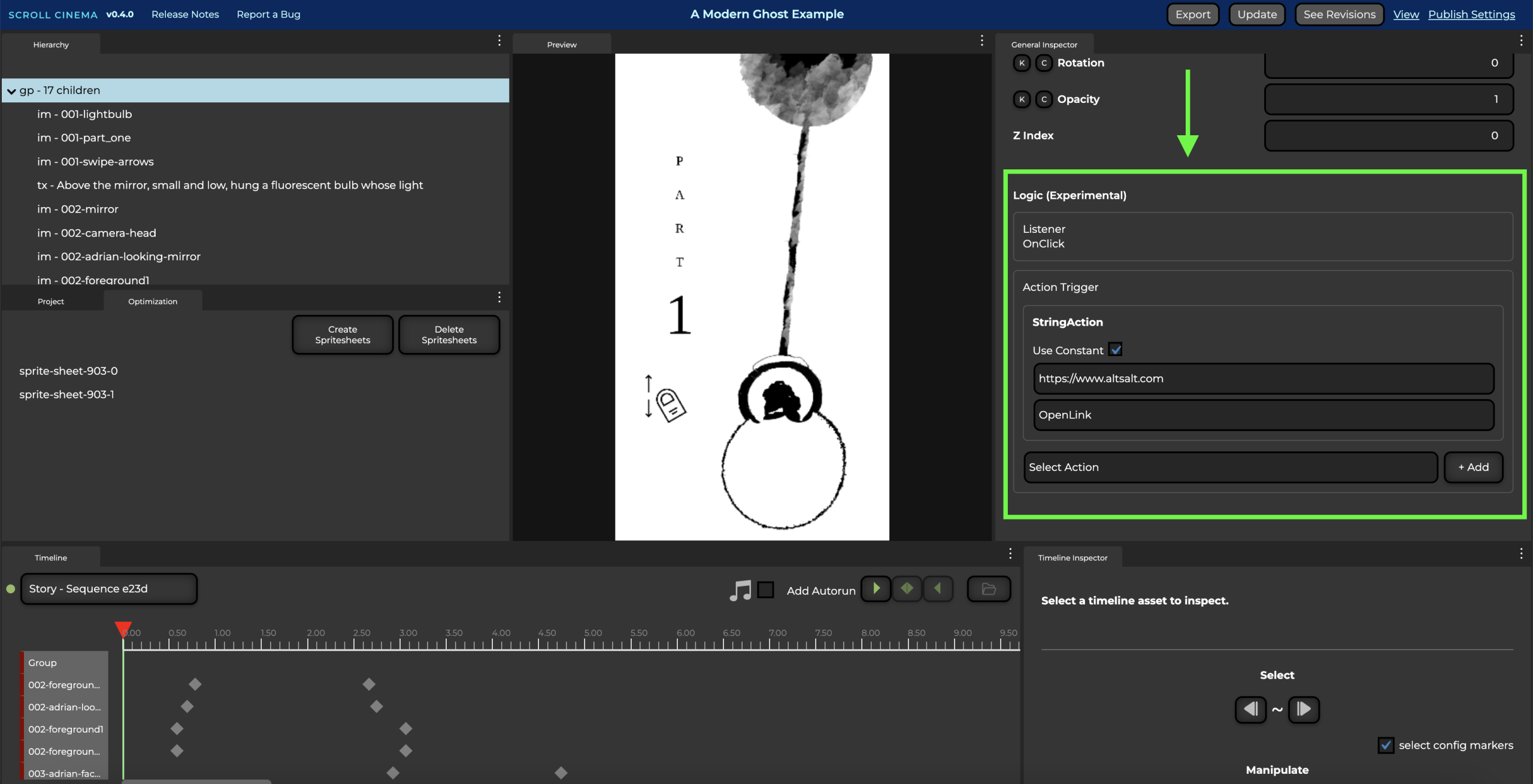
(Experimental) Logic System Preview. A preview of the upcoming Logic system allows you to configure external hyperlinks on any node. Note: This feature is still experimental and subject to change.
Thanks!
A list of known issues can be found here.
As always, I’d love any feedback on the tool! You can leave a comment here or leave your thoughts in our Discord community.
Detailed Changelog
Enhancements
- Added optimization window to create spritesheets
- Add dynamic visibility checks to improve performance on mobile
- Doubled default mouse wheel sensitivity
- Improved mobile swipe issues wherein momentum wasn’t being applied properly
- Added validation to help prevent and alert autorun misconfiguration
- Added bulk selection and editing to Timeline Inspector
- Workflow improvement: Nested group nodes and track folders are now set to the correct position in the hierarchy upon creation rather than the end of the hierarchy list
- Workflow improvement: Newly created tracks are now automatically set as children of a selected group track upon creation
- Change Shape node abbreviation to ‘sh’ to avoid confusion with group nodes in Hierarchy
- (Experimental) Add Logic system action for opening external links
Fixes
- Fixed flashing of content when scrubbing or modifying clips and keyframes
- Fixed opacity not being applied to group nodes if not being animated
- Fixed: When sequence is unselected then reselected in timeline window, the sequence is erroneously loaded with its original state before any modifications.
- Fixed: Bug causing audio popping when beyond threshold of FadePlay clips
- Fixed: Projects sometimes not updating due to browser cache
- Fixed: Projects not centered on certain mobile phone widths
- Fixed: Sequences erroneously resetting to the beginning after resizing browser
- Fixed: Momentum no longer being applied after rotating mobile device or resizing browser
- Fixed: Firefox not loading projects due to error with fonts
Leave a Reply